
How to integrate with DATEV Rechnungswesen: One connection, reading and writing
Rechnungswesen is where a German booking is finally recorded, and it is the one DATEV product you can query a ledger from. Posting a booking and querying the ledger back run on the same connection and the same two-year token, so what decides your build is not the authentication but which objects travel in which direction.

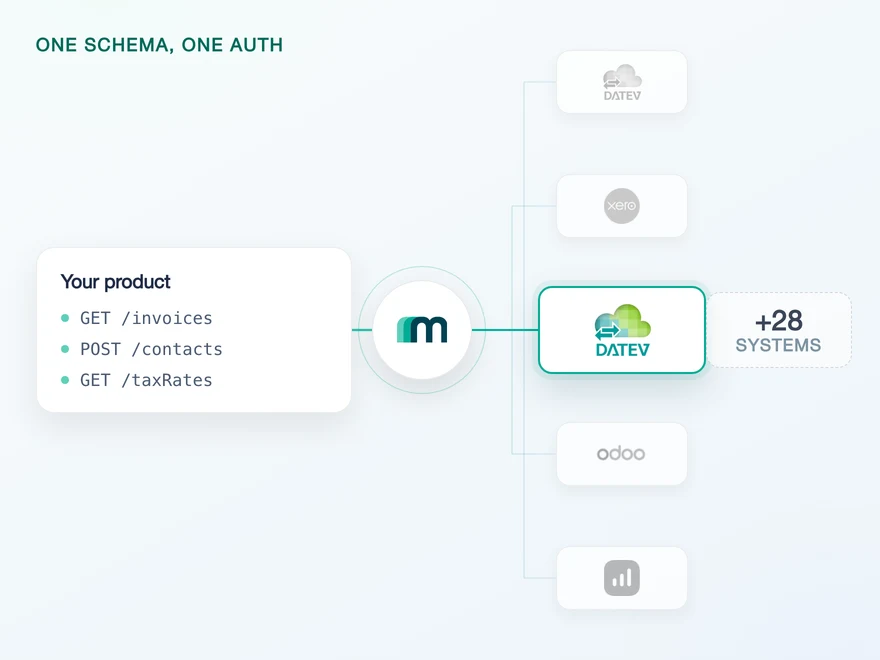
Where the booking lands, and why that is not a cloud endpoint
DATEV Rechnungswesen is the application German tax advisors and companies with in-house bookkeeping use to record bookings. It is the end of the chain rather than a stop on it, and it is the one DATEV product you can query a ledger from, which is why reporting and reconciliation products end up here rather than upstream.
It is also not a cloud product you sign up for. Our documentation is direct about it: “It does not belong to DATEV’s suite of online applications, meaning that it is essentially an on-prem application that can be hosted by a provider or on your own server.” Your customer runs it, or someone runs it for them.
That has an immediate consequence for what can reach it. Exactly one service transfers data into Rechnungswesen directly. Everything else, documents and booking proposals among them, travels through DATEV Unternehmen Online first, where the tax advisor works before anything is booked.
The commercial and coverage view of this system is on the DATEV Rechnungswesen API page, and thevendor level, meaning the whole list of DATEV data services and the interface partner status, is on the DATEV overview.
Where data travels through Unternehmen Online, our documentation states that “the tax advisor can approve and amend the data, before submitting it to DATEV Rechnungswesen”. Amend, not only approve. What ends up in the ledger is therefore not guaranteed to be what you sent, and a product that reports on its own submissions rather than on what was booked will eventually disagree with the accountant.
On-prem nature, the single direct service and the approval step from our own DATEV Rechnungswesen documentation, checked 17 August 2026.
Two target systems, and one connection carries both directions
Most systems in this catalogue have one target system, a few have two. Rechnungswesen has three, and the third one is the reason writing and reading come apart:
datev-reweis the short-token route, and its job is to list the companies a login can reach.datev-rewe-longtokenis what you work through once a company has been chosen, in both directions.
What a coverage matrix cannot show you is which of the two you end up holding. The matrix tells you that journal entries and a trial balance are readable. It does not tell you that both directions answer on the same account key, so there is no branch in your client between a write path and a read path.
# write and read path · company chosen in the flow, token valid two yearsGET /auth/datev-rewe-longtoken?environmentSelection=truex-api-key: YOUR_API_KEY# the account key it returns reaches the ledgerGET /journalEntriesx-api-key: YOUR_API_KEYx-account-key: YOUR_ACCOUNT_KEY# and the booking endpoint, on the same keyPOST /journalEntriesx-api-key: YOUR_API_KEYx-account-key: YOUR_ACCOUNT_KEY
Do not send companyId alongside environmentSelection=true on the DATEV long tokens: our authentication reference states it can stop the flow from working.
Because every export call needs a company, our documentation recommends the interactive flow here rather than the manual route: the company is selected during authentication and reused for the calls that follow, so nothing downstream has to carry it.
One more detail from DATEV’s side belongs in your data model rather than in your client code.
DATEV’s dataset identifier is unique per API rather than globally, so the same value on a Rechnungswesen API is not necessarily the same entity as on a payroll API. Keeping your own mapping between your entities and DATEV’s is therefore not optional, and DATEV asks you to explain it during the approval meetings.
One inconsistency in the documentation is worth knowing before it costs an hour: in the manual token section the third step is headed “Authenticate to DATEV Unternehmen Online” while the instruction below it names datev-rewe-longtoken. The instruction is the correct half.
The three target systems and the interactive recommendation from our own documentation. The identifier rule from DATEV’s interface requirements, section Rechte- & Rollenkonzept. Both checked 17 August 2026.
What the read side needs, and who switches it on
One connection reaching both directions does not mean DATEV has one service behind it. Writing and reading are two different DATEV data services, ordered separately by the tax advisor, and each runs on its own Online API. What changed is that both answer on the same authentication rather than on two.
DATEV offers two refresh token variants. The short one lives eleven hours and reaches every dataset the identity may see. The long one lives two years, extends itself on every refresh, and reaches exactly one dataset. Getting the long one requires the offline_access scope, and it is the token behind the connection above.
The part worth knowing before you plan a reporting feature is that the read side depends on the client credentials rather than on anything in your code. The app behind those credentials has to include the export service, otherwise the connection authenticates and the ledger stays empty. Maesn issues credentials with the full set of services for new integrations, which is why this is a sentence in an article rather than a task in your backlog.
datev-rewe-longtoken
Approved once, bound to one company, extended on every refresh.
Buchungsdatenservice
CSV, in the DATEV format
Journal entries, contacts and files
accounting:extf-files
Datenservice Export Rechnungswesen
Local master and transaction data
The ledger, the chart of accounts and a trial balance
accounting:dataexchange
The one date to plan for is two years out. DATEV requires that your connection screen shows the calculated expiry date, in at least TT.MM.JJJJ HH:MM form, along with a status and the full name of the person who issued the token. Build a renewal prompt on top of that date while you are building the connection: two years is far enough away to feel like it never happens, and the failure is quiet when it does.
Token variants and lifetimes from DATEV’s interface requirements, section Authentifizierung & Autorisierung. The service-to-API mapping from the same document, section Datenservices Rechnungswesen. Checked 17 August 2026. The single-connection setup and the client-credentials condition are our own, confirmed by the engineer who built it on 25 August 2026.
Journal entries are the only object that comes back
Ten objects are available on this system, and they sort into three groups rather than two. Seven are read-only, two are write-only, and exactly one travels in both directions: the booking itself.
That single overlap is the most useful fact about this integration, and it is also the most easily lost one. It means a posted booking can be verified against the ledger rather than against your own record, which is the difference between a reconciliation feature and a hopeful one.
It also means the round trip crosses the two DATEV data services from the previous section: you write through the Buchungsdatenservice and read back through the Datenservice Export Rechnungswesen, on one account key and one expiry date.
7 objects, out of the ledger
1 object, and it is the booking
2 objects, into the ledger
The two DATEV services cross in the middle column only. A booking written through the Buchungsdatenservice is read back through the Datenservice Export Rechnungswesen, and both run on the one connection above.
Files are the second writable object, and they are rarer than they look: creating a file is available on four of the 30+ supported systems, and both DATEV products are among them. In DATEV’s own terms this is the document alongside the booking, which is why the write side of this system speaks of a Belegsatz, a document record, and a Beleglink, the link from a booking to its document.
Those two German terms are DATEV’s own, and the second one has a limit worth knowing before you design around it. The link survives the round trip but the document does not: GET /journalEntries returns the id of the linked document in documentId when there is one, so you can tell that a booking has a receipt and which one it is. What you cannot do is pull the file itself back out. Plan on keeping your own copy of anything you need to show a user.
Object states and the four-system count from our generated coverage data, counted twice with two independent parsers.
What the ledger returns: The chart of accounts and a trial balance
Eight objects are readable through the export system, and two of them are unusual enough to change what a product can offer.
The first is the chart of accounts. It is the read that turns account mapping into a configuration screen instead of a spreadsheet exchange with the customer’s accountant. If you offer any kind of posting feature, this is what lets you show your customer their own accounts instead of asking them to type numbers.
The second is the trial balance, the Summen- und Saldenliste or SuSa in DATEV’s own vocabulary. Measured across all 30+ supported systems, two of them return a trial balance at all.
And there is a second condition that narrows it further: the report endpoint requires a fiscal year start date, and of those two systems only this one also exposes fiscal years. So one system in the catalogue returns the report and hands out its own precondition, and it is this one.
| DATEV data service | Direction | What travels | Online API |
|---|---|---|---|
| Buchungsdatenservice | Into Rechnungswesen | Structured master and transaction data as CSV, with the document link | accounting:extf-files |
| Datenservice Export Rechnungswesen | Out of Rechnungswesen | Local master and transaction data | accounting:dataexchange |
The write row carries a detail that explains why “DATEV format” is a subject in this ecosystem rather than a field. For the Buchungsdatenservice DATEV publishes two separate sets of requirements: one for the data service and one for the DATEV file format itself.
Meeting the first does not mean you have met the second. Through Maesn you post one normalised booking and the translation into that format happens on our side, which is most of the reason this integration is worth outsourcing at all.
Two smaller reads round out the list. Payment terms are available, and they are useful without being decisive. Open items are in beta rather than generally available, so if your product depends on them, treat that as a conversation rather than an assumption.
The reads are filtered and paged the same way as every other system on the platform, which matters more here than on a system you only write to: a ledger is worth paging through.
How that is normalised across systems that each invented their own parameters is the pagination and filtering subject, and a reporting product built on these reads is the shape described on financial analysis and forecasting.
Readable objects from our generated coverage data. The trial balance count and the fiscal year precondition were measured across all 30+ supported systems, with the single report endpoint identified in an earlier pass over 209 documentation URLs. Services, formats and Online APIs from DATEV’s interface requirements, checked 17 August 2026.
Contacts can be written and changed, and never read
Contacts are the second write-only object, and they behave in a way that has no equivalent elsewhere in this catalogue. You can create a contact. You can update it in place. You cannot read it back.
It is tempting to assume a second route exists, because on most systems it does: where contacts are unavailable you usually reach the same record through customers or suppliers. Not here. Both are unavailable on this system, which makes contacts the object to map a business partner onto and simultaneously the object you cannot verify.
Your side owns the record. Whatever identifier you used to create a contact has to be kept, because there is no call that will give it back to you, and an update needs it. Reconciling “what we wrote” against “what is there” is not a feature you can build for this object, so the honest design is to treat your own store as authoritative and to make that visible to your customer rather than implied.
One thing not to read into it. Our own documentation describes creating “journal entries, suppliers and customers” directly in this system, and the object states say otherwise: suppliers and customers are unavailable, contacts is the writable object.
Where the two disagree, the coverage data is what the platform actually enables, and that is what holds here. Which object a business partner maps onto across systems that all name it differently is part of the common data model.
No object on this system has delete enabled, and that is less of a limitation than it sounds in an accounting context. Corrections and cancellations are expected to be new documents rather than removals, so a design that posts a reversal is both more correct and closer to how an accountant will read the result.
Object states from our generated coverage data, which records what is enabled today rather than what DATEV could technically reach.
The log, the error rate and the rule that replaces polling
Three of DATEV’s requirements shape the design of a read-heavy integration, and none of them is an API detail. They are conditions of the production release, and they are checked.
Change detection cannot be a loop. Counted separately, because the three states of that column mean three different things: no object on this system carries a native event, eight combinations are marked on request and every one of them is a webhook, and the remaining 29 are unavailable.
On the other side DATEV lists round-the-clock polling as a DONT and asks that calls follow something the customer just requested, manually or by a rule. So the shape that is left is a read triggered by an action or by a defensible schedule. The interval is yours; “always” is not one of the options. What a system without events changes about a sync is the unified webhooks subject.
A technical log is mandatory. DATEV requires an HTTP log of requests and responses, kept for at least 14 days, from which the chronological order of calls can be reconstructed.
The minimum is specific: timestamps, the verb and the full URL including query parameters, the headers without the authorization header, and on the response side at least the X-Global-Transaction-ID and V-Cap-Request-ID headers. It does not have to be visible to your customers. It does have to exist when you open a ticket.
The error rate is a number with a price. After production release DATEV expects fewer than ten percent of requests to return 4xx or 5xx, monitors it, and exceeding it triggers a chargeable re-inspection. On a read-heavy integration against a connection that expires twice a year, the obvious way to breach that is a scheduled read that keeps running after the authentication lapsed.
Event states counted from our generated coverage data. The polling rule, the log requirement and the error rate from DATEV’s interface requirements, sections Ökonomie & Ökologie and Technischer Log, checked 17 August 2026. Paraphrased in English; the requirements are published in German.
What Maesn covers, and what stays with you
Four things stop being yours:
- Both connections and both lifetimes. Two target systems, two consents and two expiry dates are held per tenant, and your call sites see one account key shape.
- The booking format. You post the common data model; the CSV in the DATEV format, the document link and the file-format requirements behind it are handled here.
- The route selection. Whether a payload can go directly into Rechnungswesen or has to travel through Unternehmen Online is a parameter rather than a second project.
- Access to DATEV without the partner process first. You build on the Maesn client, so nothing has to be applied for, paid or waited on before your first call. If you later want to be an official DATEV Interface Partner in your own name, we run that process with you and you move onto your own client; the DATEV fees for it are yours, and you keep building in the meantime.
Four things do not move:
- Your record of every contact you wrote. The object cannot be read back, so no layer can reconstruct it. This is the clearest case on this system of a gap that is a fact rather than a feature request.
- The renewal prompt. Re-confirming the connection when its two years are up is your customer’s action, and reminding them is your product’s job.
- The log and the error budget. They run on your infrastructure and are measured against your client, so they cannot be delegated.
- What the advisor changed. Where data travels through Unternehmen Online, the advisor may amend it before it is booked. Reading the ledger back tells you what happened; nothing prevents the amendment.
One note on the objects. Eight combinations here are marked on request, all of them webhooks, and that column is a conversation rather than a switch. Our own data does not support a claim about native events in either direction, so if events on this system matter to your roadmap, the useful move is to ask rather than to infer from the matrix.
Object states from our generated coverage data. The on-request column was set in bulk without per-system verification, so it carries no claim about native events in either direction.
Frequently asked questions
What is DATEV Rechnungswesen?
How many connections does a DATEV Rechnungswesen integration need?
Does reading from Rechnungswesen need anything switched on?
What can I read out of DATEV Rechnungswesen?
Can I read a contact back out of DATEV Rechnungswesen?
Which format does a booking have to be in?
QuickBooks Online Webhooks: Events, Retries and Recovery
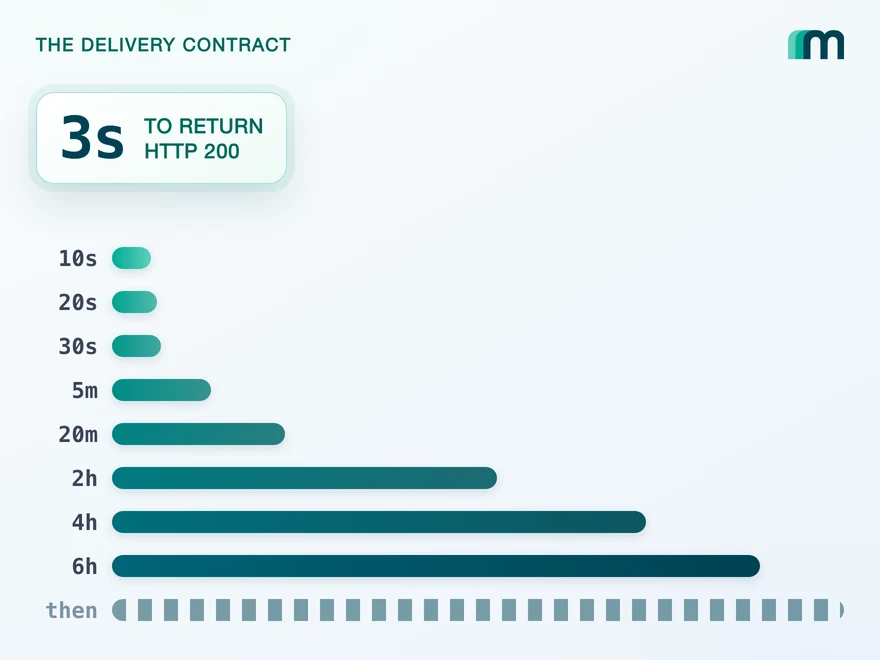
QuickBooks Online webhooks cover 29 entity types and expect HTTP 200 in three seconds. Why Intuit still asks you to poll change data capture.
Lennart Svensson · 25 Aug 2026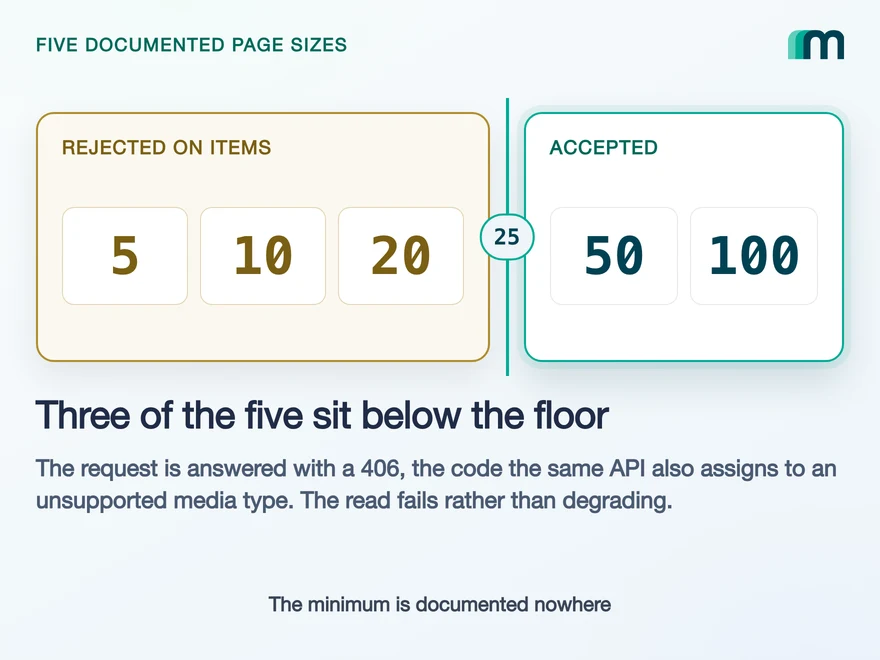
Lexware Office Pagination: The 406 and One Page Size
Lexware Office validates the page size and rejects a bad one with 406, the same code it uses for an unsupported media type. What that means for your read loop.
Lennart Svensson · 20 Aug 2026
How to Integrate with DATEV Unternehmen Online: Async Writes
Every write to DATEV Unternehmen Online is an asynchronous task, and nothing you send reads back. What that decides about your data model.
Lennart Svensson · 17 Aug 2026Build once on the Unified API.
Rechnungswesen puts two DATEV services behind one connection and one two-year token. The next system will split them again, or send an event, or offer neither. Build against one interface and each of those differences becomes a field you read instead of a branch you maintain.