
Pagination in Lexware Office: Maesn turns the per-endpoint rules into one page size
Lexware Office defines the page size per endpoint, documents no minimum and answers a rejected one with a 406, the same code it uses for an unsupported media type. Through the unified endpoint the ceiling, the counter and that status code stop being yours to remember.

Lexware Office page sizes change with the endpoint
Lexware Office applies its paging rules inconsistently, and the inconsistency is in the part you cannot read. It documents one default and a set of maxima: the default page size is 25, the ceiling is 100 or 250 depending on which endpoint you call, the parameter is called size, and five endpoints are named for the higher ceiling.
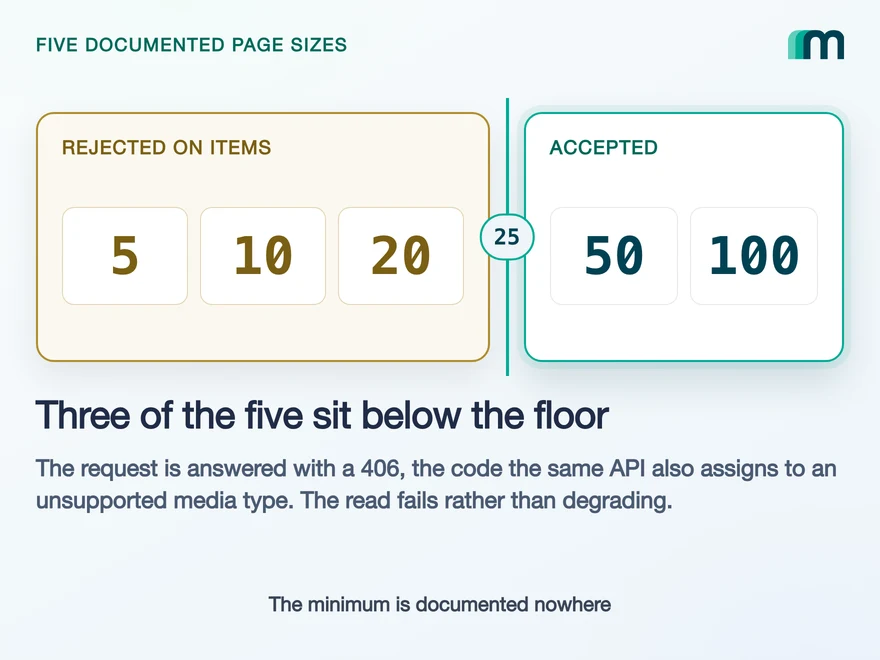
What the reference does not document, for any endpoint, is a minimum. That matters because there is one. On the Items object a page size below 25 is answered with a 406, so the read fails rather than degrading to a smaller page. The floor is reached rather than read.
51020
Below the floor on Items
Answered with 406, so the read fails
50100
At or above the floor
The page comes back at the size you asked for
Lexware Office documents a default page size of 25 and a maximum per endpoint. It documents no minimum, so the floor is reached rather than read.
limit and takes five documented values. Three of them are below 25. On that one object, three of the five values our own documentation offers are rejected, and the status code that comes back does not mention page size.Both halves of that live on the Lexware Office API page, which also carries the coverage matrix these object names come from. The matrix is where Items is defined as an object of the shared model, which is worth knowing before you go looking for an endpoint of that name in Lexware’s reference.
Default, maximum and parameter names from Lexware’s paging documentation, retrieved 20 August 2026: “Default page size is set to 25 but can be increased up to 100/250 (depends on the used endpoint)”. The table there names articles, contacts, recurring templates, voucherlist and vouchers for 250.
The floor of 25 on Items and the 406 are not from that reference. They are a first-hand report from our own integration work. No minimum page size appears anywhere in Lexware’s published paging rules, which is what makes the floor worth writing down. The report names the object rather than the side that answers, so which of the two ends of the call produces the 406 is not established here either.
A rejected Lexware Office page size returns 406
The status code is where the time goes. Lexware’s own table gives 406 two jobs: validation issues due to invalid data, and on file resources a requested media type that is not supported. Both meanings are documented on the same page.
The specification defines the code for one of those. RFC 9110 says a 406 means the target resource has no representation acceptable to the user agent according to the proactive negotiation header fields in the request. A client written against that inspects Accept and finds nothing wrong with it.
So the failure is legible in the response body and misleading in the status line. A handler keyed on the code alone reports a content negotiation problem for a query parameter, and a retry does not help, because nothing about the request would change. Unified error handling is where that ends up on our side: one error shape, whatever the system underneath called it.
In Lexware Office
Validation issues due to invalid data
On file resources, an unsupported media type
In RFC 9110
No representation acceptable to the user agent, by content negotiation
A handler that reads the status line alone cannot tell the two apart. The distinguishing detail is in the body: Lexware’s documented error response carries a message and a details list naming the field and the violation.
Lexware’s status code table, retrieved 20 August 2026, describes 406 as “Validation issues due to invalid data” and adds the media type meaning for file resources. The normative definition is RFC 9110 section 15.5.7, which frames the code entirely in terms of proactive content negotiation.
The same reference settles which of the two readings is the everyday one. Its worked example of a regular error response is a 406 carrying “Validation failed for request. Please see details list for specific causes”, with a details list naming the field and the violation. A content negotiation failure would not have a field.
Maesn harmonises Lexware Office pagination into one page size
Through the unified endpoint you send limit and page. The five values above are the documented set, the page counter starts at 1, and what each system expects underneath is translated behind the endpoint.
That is two normalisations rather than one, and both of them are the kind you would otherwise write per system. The page size becomes one set of values instead of a per-endpoint ceiling you have to look up. The page number becomes one origin instead of an off-by-one that depends on whose documentation you read last.
Both of those are one feature rather than two behaviours. Ours is called unified pagination and filtering, and it harmonises the paging contract of every connected system into a single request shape, so an inconsistency in one vendor’s API stops being something your client has to know about.
The saving is the multiplication rather than this one endpoint. A per-endpoint exception is cheap to write once and expensive to remember 30+ times, in a catalogue where the next system caps at a different number, counts from a different index and reports the failure under a different status code.
Here that difference is normalised once, on our side, and your read loop stops carrying a table of special cases.
| Unified endpoint | Lexware Office | |
|---|---|---|
| Page size parameter | limit | size |
| Documented values | 5, 10, 20, 50 or 100 | Default 25, maximum 100 or 250 by endpoint |
| First page | page=1 | page=0 |
const response = await axios.get(url, {params: {limit: 50,page: 1,},headers: {"X-API-KEY": apiKey,"X-ACCOUNT-KEY": accountKey,},});
Parameter names and the accepted values from our own filtering, ordering and pagination reference.
Two things stay with you, and both are worth planning for. Every page is a call against the target system’s rate limit, and Maesn adds no limit of its own on the way in, so on a synchronous call the system’s limit is the one that can be exhausted. The loop itself, when to run it and what to do with a rejection, stays yours to write.
Lexware Office has two other structural rules, and both decide an architecture before the first read: how often you may call at all, and the fresh read every update needs. Those are the subject of how to integrate with Lexware Office.
limit, page and the accepted values from our own reference, retrieved 20 August 2026. Lexware’s zero-indexed counter is documented in its paging section, quoted above. That Maesn adds no rate limit of its own is our documented behaviour, and it is the reason the target system’s limit is the one you plan against.
Frequently asked questions
Does the page counter start at 0 or at 1?
How do I tell a page size rejection from a media type rejection?
Does the 10.000 in totalElements cap what I can read?
Do I still have to respect the rate limit while paging?
Which Lexware Office endpoints allow a page size of 250?
Does sorting change how paging behaves?
QuickBooks Online Webhooks: Events, Retries and Recovery
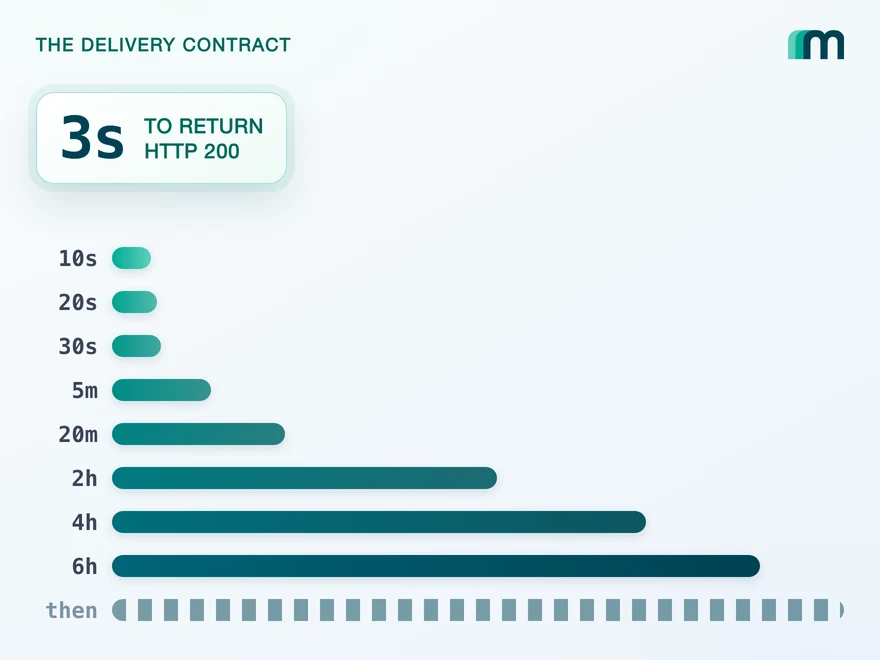
QuickBooks Online webhooks cover 29 entity types and expect HTTP 200 in three seconds. Why Intuit still asks you to poll change data capture.
Lennart Svensson · 25 Aug 2026
How to Integrate with DATEV Rechnungswesen: One Connection
One connection carries reading and writing in DATEV Rechnungswesen, on a two-year token. Which objects travel in which direction is the real decision.
Lennart Svensson · 17 Aug 2026
How to Integrate with DATEV Unternehmen Online: Async Writes
Every write to DATEV Unternehmen Online is an asynchronous task, and nothing you send reads back. What that decides about your data model.
Lennart Svensson · 17 Aug 2026Build once on the Unified API.
A page size that is legal on one object and a validation error on the next is the kind of detail you find by hitting it, once per system, for as many systems as you connect. Send one request shape instead and the exception stops being yours to remember.