
How to integrate with QuickBooks: Nine objects send events, and none of them carries the change
Nine QuickBooks objects announce their own changes through Maesn. What arrives is a notification naming the record and the operation, never the fields that moved, so every event is followed by a read. Intuit's own best practice page adds a second job on top, because an event can go missing and a poll is how you find out.

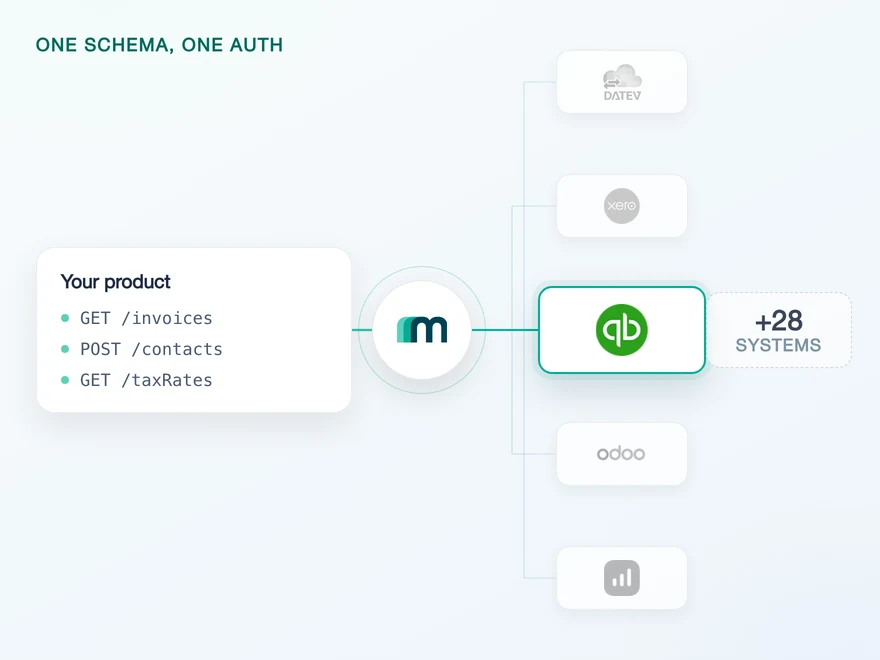
Every request carries a realm, and the token runs on two clocks
QuickBooks addresses a company by its realm id, and that id sits in the path of every call rather than in a header. A request without one is not routable, and the same id is the unit Intuit counts rate limits against. It arrives during authentication and belongs on the connection from then on.
The flow itself is ordinary. QuickBooks appears in neither the interactive nor the headless list in our authentication documentation, which means the standard redirect applies: your customer consents in Intuit’s screen, the code comes back, and the exchange happens once.
What deserves a second look is the token you get in return, because there are two expiry clocks on it and only one of them is visible by default.
POST /oauth2/v1/tokens/bearer HTTP/1.1Host: oauth.platform.intuit.comContent-Type: application/x-www-form-urlencodedx-include-refresh-token-hard-expires-in: true{"expires_in": 3600,"x_refresh_token_expires_in": 8640000,"x_refresh_token_hard_expires_in": 157680000}
3.600 seconds is one hour. 8.640.000 is the 100 day rolling window everyone plans for. 157.680.000 is five years, and it is only returned when the request asks for it with that header.
Field names, values and the opt-in header from Intuit’s OAuth 2.0 guide, checked 12 August 2026. The same page states the rule that keeps the rolling clock alive: “Always store the latest refresh_token value from the most recent API server response.”
A refresh token renews for 100 days at a time, so a connection used every week looks permanent. It is not. The absolute lifespan is five years, and when it runs out the only path forward is a full reauthorisation by the customer. Ask for the second value now and you can warn them; ignore it and you find out on the day.
Nine objects send events, and Intuit still recommends a poll
QuickBooks is generous here. Intuit’s webhook table lists 29 entities against six possible operations: created, updated, deleted, merged, voided and emailed. Nine of those objects are wired through us today, which puts QuickBooks second in our catalogue and level with Exact Online.
The six operations are the vocabulary of the whole table, not of any one object. All seven objects below send created, updated and deleted, and what varies is what sits on top of that. Invoices and payments reach five of the six, most reach four, and bills and journal entries reach three. Nothing reaches all six.
| Object | Sends | Never sends |
|---|---|---|
| Invoice | 5 of 6 | Merged |
| Payment | 5 of 6 | Merged |
| Account | 4 of 6 | Voided, Emailed |
| Customer | 4 of 6 | Voided, Emailed |
| Item | 4 of 6 | Voided, Emailed |
| Bill | 3 of 6 | Merged, Voided, Emailed |
| JournalEntry | 3 of 6 | Merged, Voided, Emailed |
Rows counted from Intuit’s entity table on the webhook configuration page, checked 12 August 2026. Two of the nine resources we expose are left out of the table above on purpose: our documentation names them SUPPLIER and EXPENSE, Intuit’s table has Vendor and Purchase, and neither side publishes the mapping. Where a source is disputed the smaller claim wins.
Now the sentence that shapes the rest of this article. On the same portal that publishes that table, Intuit’s best practice page opens with an instruction: “To compensate for the possibility of missed events, make a ChangeDataCapture (CDC) call for all required entities, dating back to the last known successfully processed webhook event for each entity.”
A system with the second widest event coverage we support documents that the events are not sufficient on their own. It goes further and suggests a daily sweep across every entity you depend on. The push is the fast path, and the poll is the correct one.
One asymmetry is worth knowing before you plan around the nine. Bills send events while reading bills is marked on demand in our matrix, which means not enabled by default rather than unavailable. If bills matter to you, ask for the read at the same time as the event. The full matrix per object sits on the QuickBooks API page.
The notification names a record, not what changed about it
Intuit is direct about this, and the sentence is easy to read past: “The data object within QuickBooks Online webhook response payloads is not the same for all cases.” The structure depends on the event type, the entity and the operation.
Its own three examples show how far that varies. A merged customer carries deletedid, the id that no longer exists. A created employee carries an alternative_ids array. An updated sales receipt carries no data object at all.
The only place the vanished id appears. Nothing else tells you two records became one.
A second identifier namespace rides along, so the id you store may not be the only one.
The most common event of the three, and the one that carries the least. Intuit's own example has no data block.
Every one of them ends in a read. The notification tells you which record moved and, through its event type, roughly how. What the record now says is a separate call.
[{"specversion": "1.0","id": "9aa4-47572edbd068-SalesReceipt-150","type": "qbo.salesreceipt.updated.v1","time": "2026-03-17T16:19:17Z","intuitentityid": "150","intuitaccountid": "9341455"}]
Everything here is an identifier or a timestamp. Note the entity id: 150, a serial number rather than a UUID, which is how QuickBooks numbers records and one of the reasons an id format cannot be assumed across systems.
Payload shapes and all three examples from Intuit’s webhook data object page, checked 12 August 2026, abbreviated here for width. The envelope is the CloudEvents format, which Intuit made mandatory in a migration whose deadline moved from 15 May to 31 July 2026 and has now passed. The serial number id is confirmed by our own CTO against Exact Online, where the same field is a UUID.
The merge case deserves a moment, because it is the one that quietly corrupts data. Two customers become one, and the event is the only place the disappearing id is ever stated. Re-read the surviving record and it looks healthy. The other id simply stops resolving, and any reference you stored against it is now pointing at nothing.
Order is not guaranteed, and one unacknowledged event stops the rest
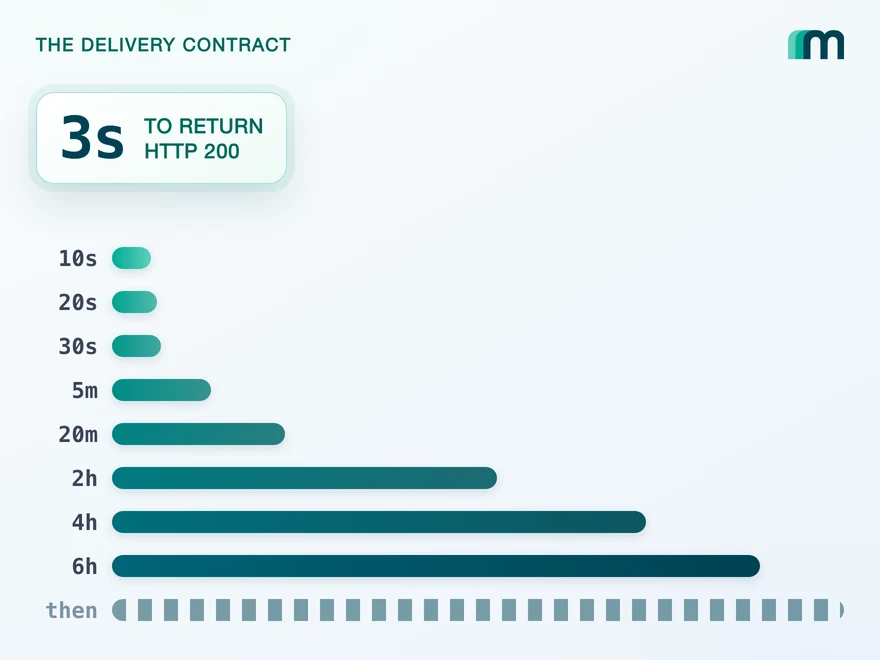
Delivery has three documented properties, and each one rules out a different shortcut. The first is the window. Intuit asks you to “ensure that your app responds to a webhooks notification with a HTTP 200 status code within three seconds”, which is short enough that any real processing has to happen after the response, not before it.
Miss it and Intuit retries on a published ladder: 10s, 20s, 30s, 5m, 20m, 2h, 4h, 6h, and then every six hours. That much is normal. The next sentence is not: “You may not receive subsequent events from our system until you correctly acknowledge the first event.”
A single event your endpoint cannot accept does not fall out of the stream on its own. It can hold up what is behind it, which turns one malformed handler into a stalled pipeline for that customer. The queue belongs outside the endpoint for exactly this reason.
The third property removes the assumption most sync code is built on. Intuit states that “it’s possible to receive events out of sequence”, so arrival order is not change order, and the timestamp in the payload is what you sort by.
Acknowledgement window, retry intervals, ordering and the queue advice from Intuit’s webhook best practices, checked 12 August 2026. The three second window is stated a second time, together with what happens when you miss it, in Intuit’s article on delayed or missing notifications. One caution about that page: it names a timestamp field as the source of truth, while the documented CloudEvents payload carries time. Read the field you actually receive rather than the one the prose names.
The best practice page says event notifications are sent one realm id at a time. The CloudEvents migration notice says a single notification can contain events for different companies and that your app must handle that. Both are current. Build for the second and the first costs you nothing.
Change data capture takes an entity list and a date
Change data capture is the mechanism Intuit points you at when an event goes missing, and it is a filter rather than a feed: one GET with two parameters, entities for the object types you want and changedSince for the point you want to look back to. Unlike an event it returns the full payload for everything that changed, and deleted records come back with a status rather than silence.
The boundaries are firm. Thirty days is the furthest back it reaches, and a response holds at most 1.000 objects. Intuit recommends shorter windows for that reason, since a sweep that overflows the ceiling drops changes without telling you.
GET /v3/company/<realmId>/cdc?entities=Invoice,Customer&changedSince=2026-08-11T09:00:00-07:00 HTTP/1.1Host: quickbooks.api.intuit.comContent-Type: text/plain
Comma separated entities, one ISO timestamp, and a content type of text/plain rather than JSON. Anything deleted in the window returns "status": "Deleted" instead of a payload.
Window, ceiling, parameters and the deleted marker from Intuit’s change data capture page, checked 12 August 2026. The same page names the five entities the operation does not cover: JournalCode, TaxAgency, TimeActivity, TaxCode and TaxRate.
That exclusion list is where the two mechanisms stop covering each other. Most of what you can read here also sends events. The exceptions are users and tax rates, and tax rates is also one of the five entities change data capture refuses.
- Event, and covered by change data capture
- 8 objects
- Accounts, Customers, Expenses, Invoices, Items, Journal entries, Payments, Suppliers.
- No event, but change data capture reaches it
- Users
- Intuit's webhook table has no user entity, so a poll is the only way to see a change.
- No event, and excluded from change data capture
- Tax rates
- TaxRate is one of five entities the change data capture operation names as unsupported.
One object has neither. For tax rates the only way to notice a change is to read them again on a schedule you pick, which is the same position you are in with a system that sends no events at all.
In practice that is a small problem with a sharp edge. Tax rates change rarely, which is exactly why nobody notices when the change is missed, and a stale rate is the kind of error that surfaces in an invoice total rather than in a log. Re-read them on a schedule and treat that schedule as deliberate.
The query language has no joins, and old minor versions are gone
Reading in QuickBooks means writing a statement that looks like SQL and is deliberately weaker than it. Intuit lists what the query operation does not support: projections, OR in a where clause, GROUP BY, JOIN and special characters. You also query one entity at a time.
Pagination lives inside the same statement. MAXRESULTS caps at 1.000 and defaults to 100, STARTPOSITION is the offset you track yourself, and the total record count is a second query rather than a field in the first.
SELECT * FROM InvoiceWHERE TxnDate > '2026-08-01'ORDERBY IdSTARTPOSITION 1 MAXRESULTS 100SELECT count(*) FROM Invoice WHERE TxnDate > '2026-08-01'
Ordering by Id is safe, filtering by it is not: the id field accepts only = and IN, so a keyset window over ids is not available and the offset walk is the only route through a large result.
Syntax, unsupported clauses, the id field restriction and both page sizes from Intuit’s query operations page, checked 12 August 2026.
Around that sit several limits at once, and they are different kinds of thing. Four are a pace, one is a duration, and one is a monthly quota. That last one is counted per workspace rather than per company, so unlike every other row it is shared by all your customers at once and every connection you add spends from it.
| Limit | Counted against |
|---|---|
| 500 requests per minute | One realm |
| 10 requests per second | One realm and app |
| 40 batch requests per minute | One realm and app |
| 800 requests per minute | One realm and app, mixed endpoints |
| 120 seconds per request | Anything longer times out |
| 500.000 CorePlus calls per month | One workspace, all customers |
Every figure from Intuit’s call limits page, checked 12 August 2026, which also states the recovery rule: a 429 means waiting 60 seconds before retrying. The same page carries Intuit’s own caveat that requests run in a multi-threaded environment and may produce timing issues.
Intuit retired minor versions 1 to 74 on 1 August 2025. A request naming anything below 75 now receives version 75 anyway, and a request naming nothing receives 75 as well. The failure mode is the quiet one: your pin still looks like a pin, and the schema underneath it has moved.
Retirement date and the fallback behaviour from Intuit’s minor versions page, checked 12 August 2026.
One rule belongs here rather than in a section of its own, because it explains why writing reaches fewer objects than reading: an update replaces the whole record unless it is marked sparse, and Intuit’s invoice reference states the consequence plainly, that “writable fields omitted from the request body are set to NULL”.
Pagination that behaves the same way on every system, and a delta filter that does not depend on each vendor’s idea of an offset, is what the pagination and filtering layer exists for. The errors underneath it, including the 429 above, arrive in one shape through unified error handling.
What stays on your side: The read, the queue and the app
QuickBooks is a well documented system, and most of what is above is discoverable. The cost is not discovery, it is that every one of these rules has an equivalent in the next system and none of them match. What we take off the list:
- The realm and both token clocks. The id is resolved during authentication and added to every request, the access token is refreshed per connection, and the latest refresh token is the one we keep.
- One event shape instead of six operations. The CloudEvents envelope, the varying data block and the per-entity naming reach your code as the same event you already handle for every other system.
- The offset walk and the second count query. Statement construction, the 100 default, the 1.000 ceiling and the id field restriction sit behind one paged interface.
- The read before the write. We fetch the current record, apply the fields you sent and return the complete entity with the token QuickBooks expects, so a partial update does not clear what you left out.
What stays with you, and the first of these is a decision rather than a task:
- How often you sweep, and how far back. Intuit recommends a daily change data capture call per entity. How fresh your product needs to be, and what that costs against a monthly quota shared by all your customers, is a product decision we can inform and not replace.
- Your queue and your acknowledgement. The three second window is answered on your side of the callback. Processing belongs behind it, and so does the ordering you apply once events arrive out of sequence.
- The app, its scopes and its webhook configuration. The QuickBooks app is registered in your product’s name, and the resources and event types are chosen inside it. That choice applies to everyone who connects, and production and sandbox are configured separately.
- Tax rates. No event and no change data capture coverage means no mechanism can tell you they moved. Whoever owns your tax logic owns that refresh.
Frequently asked questions
Does QuickBooks support webhooks?
Why does Intuit recommend polling if it already sends events?
How long do I have to acknowledge a QuickBooks webhook?
How far back can change data capture look?
What happens if I omit a field when updating a QuickBooks record?
Which minor version does QuickBooks use if I do not send one?
QuickBooks Online Webhooks: Events, Retries and Recovery
QuickBooks Online webhooks cover 29 entity types and expect HTTP 200 in three seconds. Why Intuit still asks you to poll change data capture.
Lennart Svensson · 25 Aug 2026
Lexware Office Pagination: The 406 and One Page Size
Lexware Office validates the page size and rejects a bad one with 406, the same code it uses for an unsupported media type. What that means for your read loop.
Lennart Svensson · 20 Aug 2026
How to Integrate with DATEV Rechnungswesen: One Connection
One connection carries reading and writing in DATEV Rechnungswesen, on a two-year token. Which objects travel in which direction is the real decision.
Lennart Svensson · 17 Aug 2026Build once on the Unified API.
QuickBooks asks you to poll on top of its events, sevdesk has no events to poll on top of, and Business Central expires the subscription underneath them. Build against one interface and each of those becomes a row in a table rather than a project.