
DATEV Unternehmen Online or Rechnungswesen: One object is writable on both
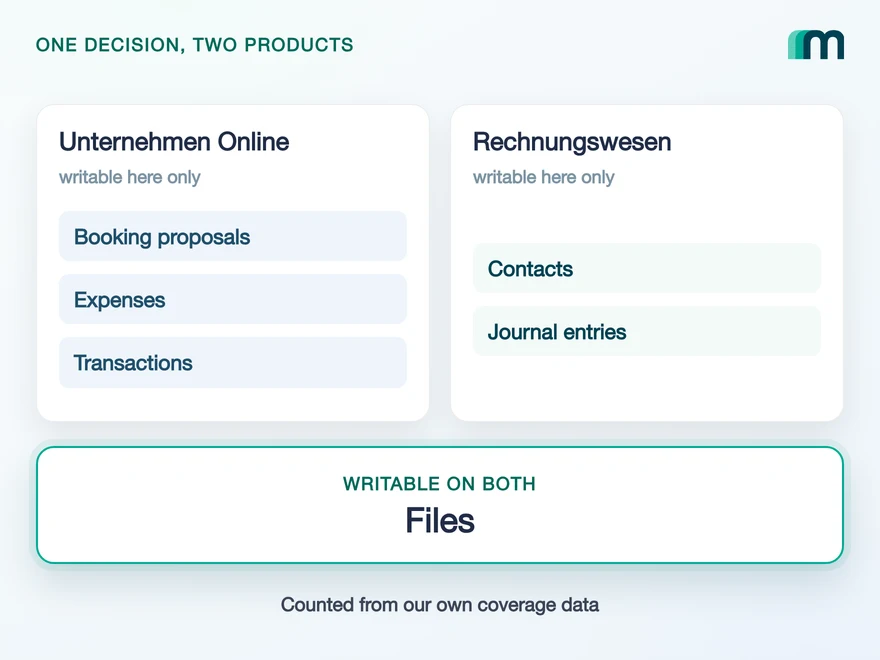
Both DATEV products take data from your application and only one of them gives any back. The lists barely overlap: a booking proposal exists on Unternehmen Online, a journal entry on Rechnungswesen, and the document image is the single payload both accept. This is the comparison from the object side, which is the side that decides the build.

What each DATEV product is, and who runs which one
DATEV Unternehmen Online is the cloud platform where a German business and its tax advisor exchange receipts and accounting data. DATEV Rechnungswesen is the application where the booking is finally recorded, and it runs on a provider’s server or on the customer’s own rather than as a cloud product you sign up for.
Which one a company has follows from who does the bookkeeping. A business that hands it to its tax advisor works in Unternehmen Online and the advisor works in Rechnungswesen. A business that books in house has Rechnungswesen and still has Unternehmen Online, as the cloud route into its own instance.
Neither case stops an integration from reaching Rechnungswesen. Even where only Unternehmen Online is in use, the instance running at the customer’s tax advisor is reachable, identified through the advisor and client identification. So the question is not which product a customer owns. It is which one holds the data your feature is about.
This article answers that one question. How to build against either product once you have chosen is a subject of its own, and each has its own guide: the Unternehmen Online guide covers asynchronous writes and the two-stage token, the Rechnungswesen guide covers three target systems and two token lifetimes.
The commercial and coverage detail per product sits on the DATEV Unternehmen Online API page and the DATEV Rechnungswesen API page, and the vendor level, meaning the full list of data services and the partner status, sits one level up on the DATEV overview.
Product descriptions from our own documentation and from DATEV’s file interface index, which labels the CSV interface as Rechnungswesen and the XML interface as Unternehmen online, checked 18 August 2026. Quoted verbatim in our source file for this article.
Which objects each product accepts
Unternehmen Online accepts 4 objects and Rechnungswesen accepts 3, and the two lists share 1: Files. That overlap is not a choice you get to make. A document always goes to Unternehmen Online, including when the booking it belongs to is being written into Rechnungswesen, so the two products share the row because they share a station rather than because the payload can go either way.
It also means the first mapping most teams attempt does not exist on either product. An invoice in your system does not become an invoice in DATEV: Invoices, Bills and Credit notes are not writable objects here, and the document travels as a file while the data about it travels as something the target product recognises.
What that something is differs, and this is the row that decides most builds. A booking proposal is a suggestion for the advisor to review, and only Unternehmen Online takes one. A journal entry is a finished posting, and only Rechnungswesen takes one.
| Object and operation | Unternehmen Online | Rechnungswesen |
|---|---|---|
| Files, create | yes | yes |
| Booking proposals, create | yes | no |
| Journal entries, create | no | yes |
| Journal entries, read | no | yes |
| Contacts, create and update | no | yes |
3 objects, and none of them is a booking
2 objects, and one of them is the booking
Files, and nothing else. A document always goes to Unternehmen Online, including when the booking it belongs to is written into Rechnungswesen. What the document means, the proposal or the posting record, is what decides the product.
Files · create is enabled on 4 of the 29 systems in our catalogue, and two of those 4 are these two DATEV products. Delivering a document to DATEV is therefore unusually well supported. Deciding what the document means is where the two products diverge.
Through Maesn both products answer on one interface, so the choice below is a target and a payload rather than two integrations. You post the common data model and the translation into the shape each product expects happens on our side.
Object states from our generated coverage data, which records what is enabled today rather than what DATEV could technically reach. Read at build time, so the sentences above cannot drift away from the matrix.
Where a debtor or creditor account lives
On Rechnungswesen, and under a different name. The German personal account, the Personenkonto, is Contacts in our model. It can be created and updated in place on Rechnungswesen, it cannot be read back, and on Unternehmen Online it does not exist at all.
Three vocabularies meet on this one object, and they all mean the same record. What German accounting calls a Debitor or a Kreditor is what most product teams call a customer or a supplier, and both of them reach DATEV through Contacts. The distinction between the two is the account number, not the object: a Debitor sits in one number range and a Kreditor in another, and both are written as a Personenkonto.
That is why Customers and Suppliers are not separate objects here, and a team that maps to those two names looks for something that never existed under them. Map to Contacts and the record is there.
The consequence shows up in real projects rather than in a table. A product that synchronises supplier master data and also delivers incoming invoices has two halves that land on two different products: the invoice reaches Unternehmen Online as a document plus a proposal, the account reaches Rechnungswesen as a contact.
If your feature is a two-way customer and supplier data sync, the read half of it does not exist on either DATEV product for this object. Plan the one-way version and keep your own record of what you wrote.
A contact you write cannot be read back, and there is no second route to the same object, so nothing on the DATEV side can confirm later what you sent. Store the account number, the time and the outcome in your own database next to the customer. A support question three weeks later has no other answer.
Object states from our own coverage data. Two layers, both named on purpose: our integration documentation describes writing “journal entries, suppliers and customers”, while the coverage matrix carries Customers and Suppliers as unavailable and Contacts as the writable object. The matrix is the source of truth for what is enabled, and the same decision was taken on both money pages (B-35).
How a document reaches the ledger
Three data services, and you use exactly one per call. The Belegbilderservice takes a document image on its own. The Rechnungsdatenservice 1.0 takes the same image together with its structured data, so the advisor receives a booking proposal instead of a scan to type up. The Buchungsdatenservice takes a finished journal entry.
The first two deliver into Unternehmen Online and end at something a person still has to act on. The third writes into Rechnungswesen and ends at a posting in the ledger. Which one you call follows from what you have: a PDF alone, a PDF with its data, or a booking that is already reconciled on your side.
What happens next is a step your call does not make. The structured data does not continue into Rechnungswesen on its own: it is provided to the DATEV data centre from the Unternehmen Online interface, by the business or by the advisor after the cash ledger has been checked, and it is retrieved into the Rechnungswesen instance from there.
Files
the Maesn objects you write
Belegbilderservice
Your customer's tax advisor reviews the document first
Reaches Rechnungswesen on a manual trigger
Booking proposals
the Maesn objects you write
Rechnungsdatenservice 1.0
The advisor gets a proposal rather than a scan to type up
Reaches Rechnungswesen on a manual trigger
Journal entries
the Maesn objects you write
Buchungsdatenservice
No review step, the posting record is already reconciled
Written into the ledger by the service itself
The difference that reaches your users is the arrival line. On the two Unternehmen Online routes your call ends at something a person still has to act on; through the Buchungsdatenservice it ends at a posting in the ledger.
The prerequisites differ per route as well, and all of them live in your customer’s account rather than yours.
Posting a document image needs Unternehmen Online with the Belegbilderservice. Booking proposals need the Rechnungsdatenservice 1.0 instead. Posting journal entries directly needs Rechnungswesen and the Buchungsdatenservice on top.
One prerequisite is easy to attach to the wrong call: the cash ledger that a DATEV user creates by hand as a clearing account belongs to POST /expenses, not to POST /bookingProposals. A booking proposal does not need one.
Each route also has its own file format, and the format follows the destination rather than your preference: which DATEV format belongs to which target is a subject of its own. You never write one of those files yourself. You send JSON to our REST API, and we build the CSV or XML the destination expects.
An accepted write into Unternehmen Online means the document arrived where the advisor will look for it. It does not mean the amount is booked, and only the advisor decides when that happens.
So do not label the result “booked”. Carry two states in your data model and show them apart, for instance Sent to DATEV and Booked. Adding the second state while you build costs an afternoon. Explaining to a customer why a balance has not moved, after your screen told them it was booked, costs considerably more.
The services and their payloads from DATEV’s Schnittstellenvorgaben Cloud Integration, section Datenservices Rechnungswesen, checked 17 August 2026. The two-step transfer and the customer-side prerequisites per route are our own published description of the procedure, which points at DATEV’s help centre for the click path.
Only Rechnungswesen answers a read
Rechnungswesen returns 8 objects and Unternehmen Online returns 5. The count matters less than which ones. Both products return Accounts, Async task, Fiscal years, Tax rates, Users, and Accounts in that list is the chart of accounts every booking is posted against, which is the read teams underestimate most often. Rechnungswesen then adds what a reporting or reconciliation product is after: Journal entries, Payment terms, Trial balance.
Journal entries is the one object that makes the round trip. You post a posting and you can query it back, which is what separates a reconciliation feature from a delivery feature and why a reporting product ends up on this product rather than upstream of it.
One condition comes with the read, and it changes a design rather than a call. Only finalised data is available: entries become exportable after the posting batches have been finalised, the Festschreibung, and transferred through DATEV’s standard posting process. A booking that exists in the advisor’s screen is therefore not automatically a booking you can query.
What the export returns and what the finalisation rule does to a sync schedule is covered in the guide to the DATEV Datenservice Export Rechnungswesen. For a product built on the numbers rather than on the documents, that read is the whole reason DATEV is on the roadmap, and financial analysis and forecasting is what teams do with it.
Readable objects counted from our generated coverage data. The Festschreibung precondition and the export service from our own DATEV documentation and from the export article linked above.
Which product your use case lands on
The decision follows from what your product produces rather than from what your customer owns, and each row carries the object state it rests on.
| What your product needs to do | Product | Why |
|---|---|---|
| Deliver a receipt or an invoice as a document | Either | Files can be created on both |
| Deliver a document plus a record the advisor reviews | Unternehmen Online | Booking proposals exist only there |
| Post a finished, reconciled booking | Rechnungswesen | Journal entries can be created only there |
| Query the ledger, the chart of accounts or a trial balance | Rechnungswesen | Those reads exist only there |
| Create or change a debtor or creditor account | Rechnungswesen | Contacts write only there, and never read back |
| Send or receive an e-invoice over PEPPOL | Neither | That is the DATEV E-Rechnungsplattform |
The last row is the one that surprises teams, because an e-invoice looks like an invoice and an invoice looks like accounting. DATEV runs a third target for it, and the E-Rechnungsplattform guide covers what is possible there today and what is not.
Most products end up on both of the two products in this comparison, and that is the normal outcome rather than a sign of a wrong decision. What the table prevents is the other case: building the delivery half against Unternehmen Online, then discovering during a reconciliation feature that the ledger was never readable from there.
Corrections and freshness on both products
Three properties hold for both products and each of them changes a design decision. Only Contacts can be updated in place, and only on Rechnungswesen. No object on either product supports a delete. And no object on either product sends a native event.
The first two follow accounting practice rather than a gap in the interface. A recorded booking is not edited and not removed, it is corrected by a counter booking, which is also how an auditor expects to see it. Building an update path for journal entries is work that would be rejected by the domain even if the endpoint existed.
The third one has a second half that is easy to miss. With no events to subscribe to, the reflex is a schedule, and scheduled reads are fine. What DATEV lists as a DONT, in the section Ökonomie & Ökologie of its interface requirements, is round-the-clock polling with no customer interest behind it. A DONT is not a technical block and nothing rejects the call; it endangers the approval of your integration, which is the expensive kind of problem because it surfaces late.
In practice the line is the reason for the call rather than its frequency. A read that follows something your customer did, or a rule they configured, is what DATEV asks for. A loop that runs every minute on every tenant whether or not anyone is waiting for the data is what it argues against.
Freshness on either product is therefore a product decision, and how event coverage varies across systems is what makes that decision comparable across the rest of your catalogue.
Update, delete and event states counted from our generated coverage data. The polling rule from DATEV’s interface requirements, section Ökonomie & Ökologie, checked 17 August 2026. The ondemand markings in the matrix are counted separately and not interpreted in either direction (A1).
What stays your decision
Three things stop being yours once you connect through Maesn, and the rest stays with you. Both halves are worth knowing before you plan the work:
- Access to DATEV without the partner process first. You build on the Maesn client, so nothing has to be applied for, paid or waited on before your first call, and that holds for both products. What DATEV approves is an integration rather than a product, and which data services it uses is what defines it. If you later want to be an official DATEV Interface Partner in your own name, we run that process with you and you move onto your own client; the DATEV fees for it are yours, and you keep building in the meantime. The partnership guide covers what DATEV checks and when.
- The formats and the services behind each route. Whether a payload leaves as a document image, as structured XML or as a posting record in DATEV format, and which data service it travels through, is decided here.
- Two products behind one account key shape. Which target system a call belongs to, and the login and token behind it, resolve during the connection instead of in your call sites.
Three things do not move, and two of them are decisions rather than work:
- Which product a feature targets. The object your feature produces narrows that to one answer, and which feature comes first is yours.
- What your interface tells the customer. Delivered is not booked, and a contact you wrote cannot be read back. Both facts are about wording in your product, and no interface can hide them without lying.
- What triggers a call. A customer action or a defensible rule is a product decision, and it is where DATEV’s constraint and your own roadmap have to be reconciled.
Approval scope from DATEV’s interface requirements, checked 17 August 2026. Target systems and token lifetimes from our own authentication reference.
Frequently asked questions
What is the difference between DATEV Unternehmen Online and Rechnungswesen?
Which DATEV product do I need for my integration?
Can I post a journal entry into DATEV Unternehmen Online?
How does data get from Unternehmen Online into Rechnungswesen?
Can I read data back out of DATEV?
Where do supplier and customer master records go in DATEV?
Do I need my own DATEV approval to start?
QuickBooks Online Webhooks: Events, Retries and Recovery
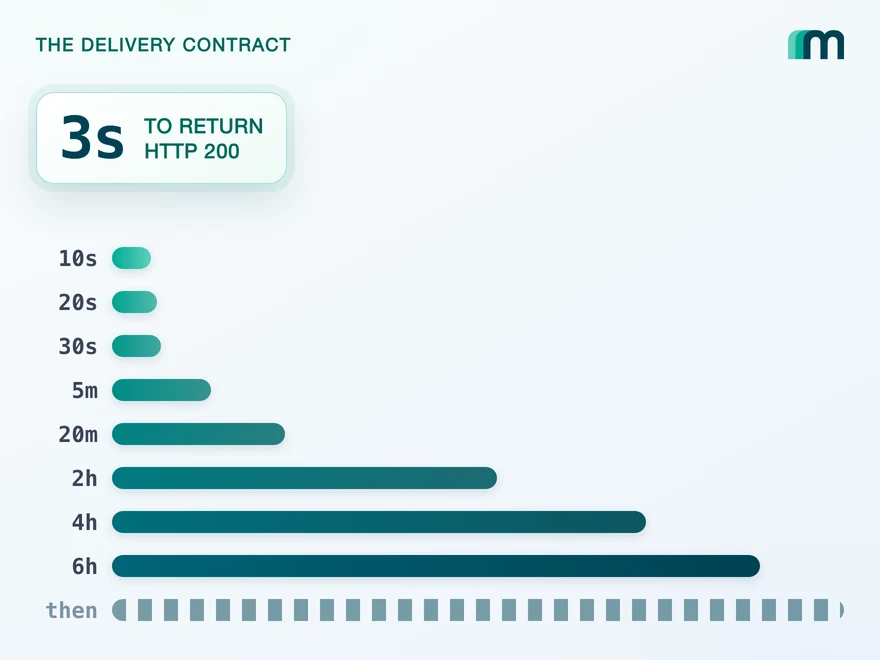
QuickBooks Online webhooks cover 29 entity types and expect HTTP 200 in three seconds. Why Intuit still asks you to poll change data capture.
 Lennart Svensson · 25 Aug 2026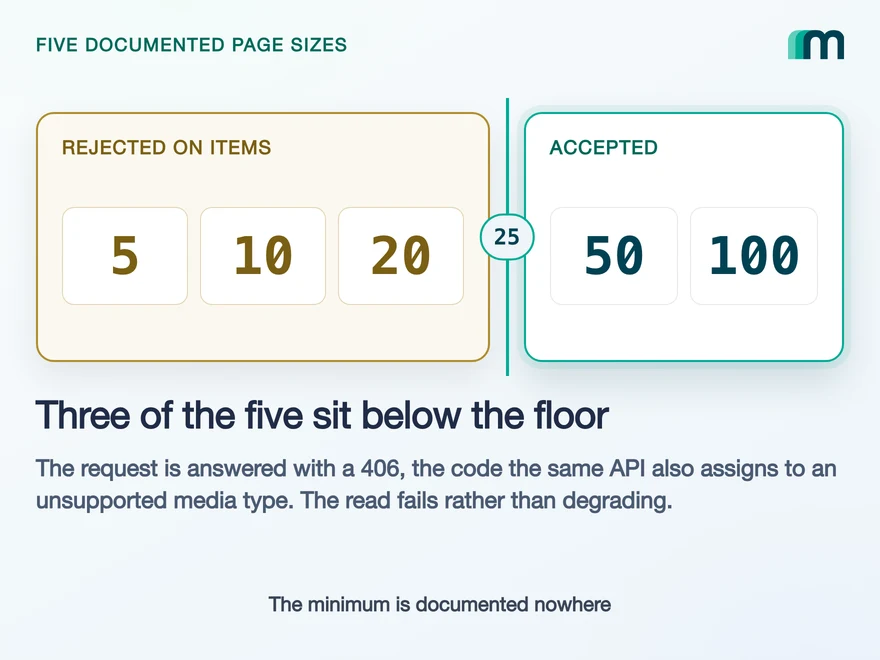
Lexware Office Pagination: The 406 and One Page Size
Lexware Office validates the page size and rejects a bad one with 406, the same code it uses for an unsupported media type. What that means for your read loop.
Lennart Svensson · 20 Aug 2026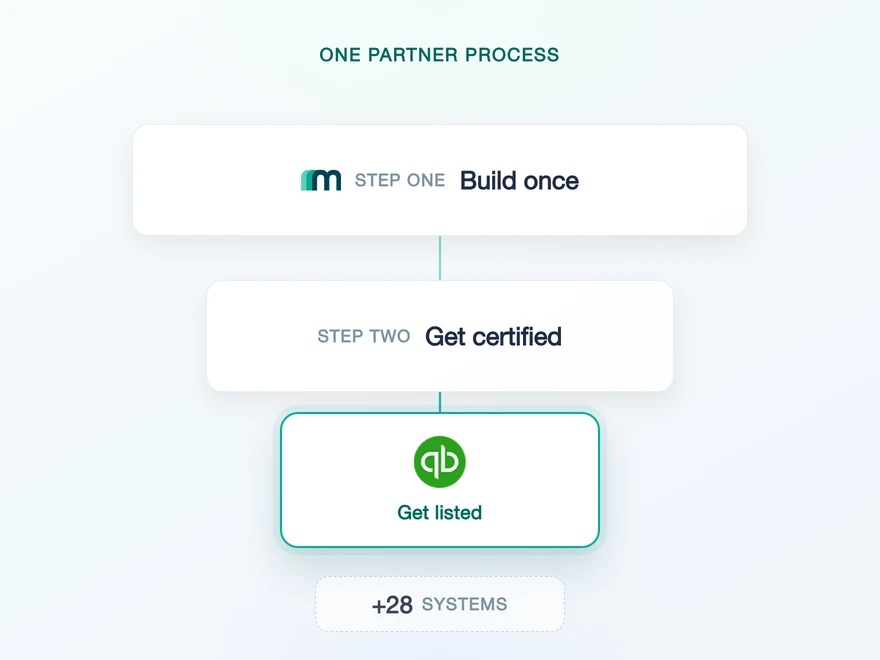
QuickBooks Partnership Guide: Fees and Marketplace Listing
Intuit meters what you read and not what you write. Four tiers, four rate cards, and on the free tier the calls above your credits are blocked rather than billed.
Dr. Themo Voswinckel · 13 Jul 2026Build once on the Unified API.
Two DATEV products that share one writable object are two integrations if you build them yourself, and one target parameter if you do not. The next system will hand you a different split again, and on one interface each of those differences is a field you read instead of a branch you maintain.